Build a Follow-Up Sequence
Turn a collection policy into a safe, ordered cadence with triggers, exits, conditions, messages, tasks, and escalation.
Build a sequence when the team has a repeatable follow-up policy that must run consistently across eligible invoices.
1. Write the Policy Before the Steps
Define:
- which invoices enter the sequence
- whether an operator starts it or overdue state starts it automatically
- which client events must stop it
- when a human task or escalation replaces another message
- who examines relationship-sensitive actions
A sequence must encode an agreed collection policy. It must not invent one inside the editor.
2. Create the Draft
- Open Settings → Follow-up sequences.
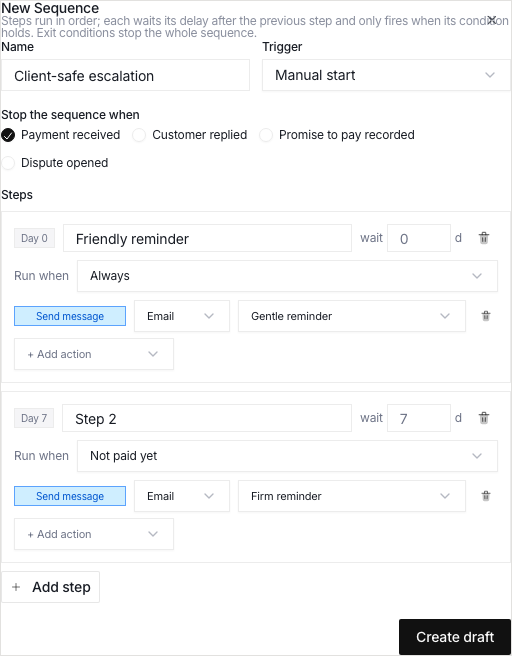
- Click New sequence.
- Give the sequence a name that explains its audience or posture.
- Keep it as a draft while you build and check it.
Examples: Standard service-business cadence, High-value client review, or Final notice with manager handoff.
3. Choose the Trigger
Use Manual start when an operator must check eligibility first.
Use When invoice overdue when the same policy must enroll eligible invoices after a set number of days past due.
Start with manual enrollment if the team does not know the workflow yet.
4. Select Every Exit Condition
Turn on the states that invalidate further follow-up:
- payment made
- client replied
- promise to pay recorded
- dispute opened
If you leave out an exit condition, a technically valid step can become a bad client interaction.
5. Build From Gentle to Explicit
A practical sequence can use:
- a gentle email when the invoice first becomes overdue
- a firmer email only if there is still no reply or payment
- a high-priority call task for a human owner
- a final notice and collection-stage change
- a manager notification before further escalation
Use the cumulative-day marker to check the real intervals. Conduitt measures each delay after the previous step.
6. Match Conditions to Actions
- Use No reply since last step before you send a second message that assumes silence.
- Use Not paid yet before a payment-focused reminder.
- Use No reply and not paid for a firmer escalation.
- Use More than N days past due for a stage or priority change tied to age.
Combine a message with a task if the next outcome needs a call or an account-owner decision.
7. Review and Activate
Before activation, check:
- every step has a clear name and at least one action
- templates match the intended tone
- task titles tell the assignee what to do
- collection-stage changes show the real policy
- exit rules cover payment, reply, promise, and dispute states as needed
- delays do not violate the team's communication policy
A sequence can send messages to clients automatically. Activate it only after another owner checks it.
8. Start Small and Examine the Dunning View
Start the sequence on a controlled set of eligible invoices. Examine Collections → Dunning for sends, skips, deferrals, promises, and available lift before you expand use.
Pause or cancel the sequence for a thread when new context makes the next steps incorrect.