Settings SSO
Configure enterprise access, verified domains, join policy, and directory sync.
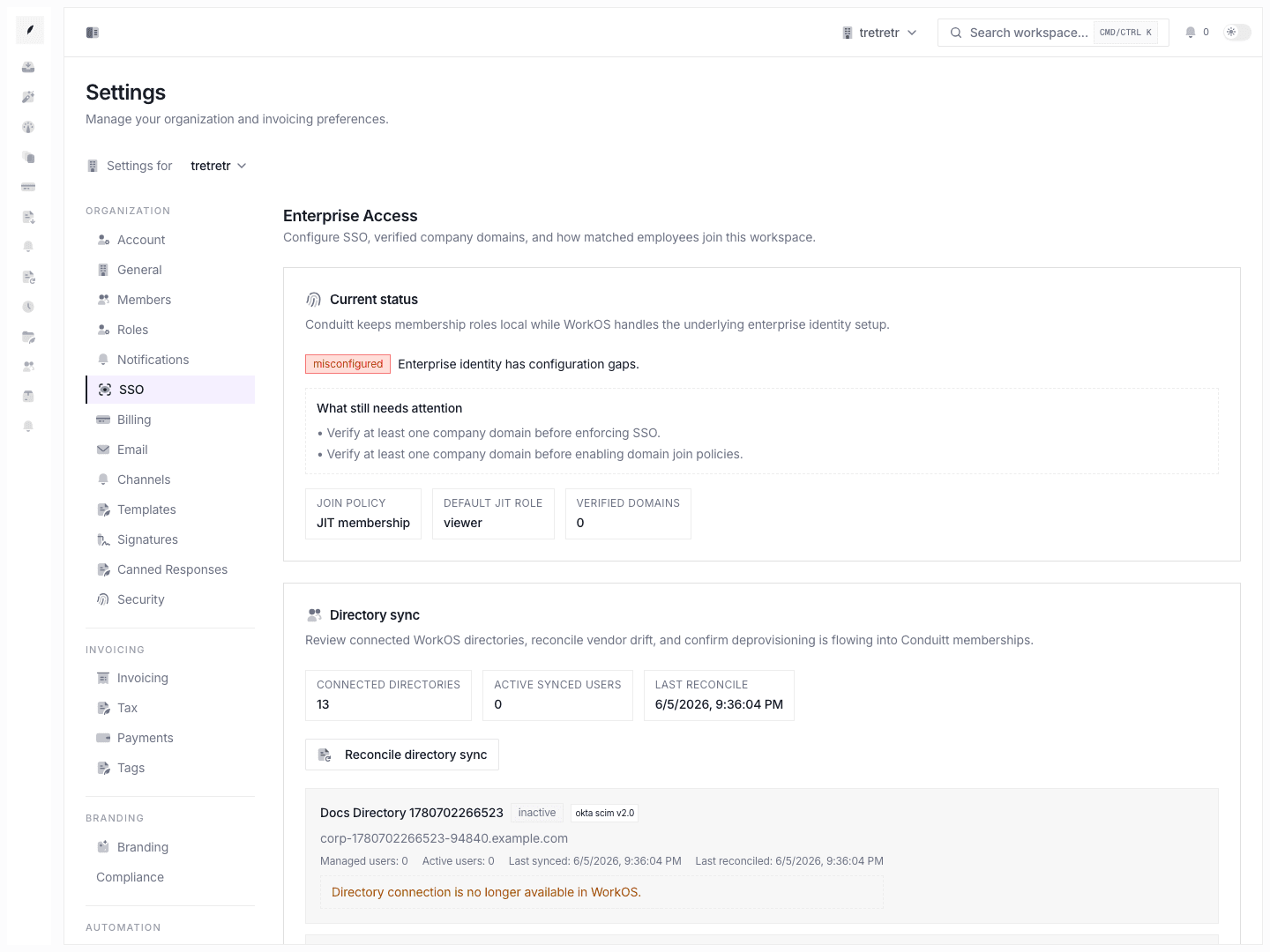
Settings → SSO is where you manage the enterprise identity controls that govern how company users join and access the workspace.
Typical Workflow
- Open Settings → SSO.
- Review current enterprise status.
- Set
Require SSO, join policy, and JIT default role if needed. - Add and verify company domains.
- Review directory sync state and reconcile when necessary.
After setup, employee access follows the organization’s intended identity policy without breaking workspace ownership protections.
What you can configure
- SSO requirement
- domain join policy
- JIT default role
- company domains
- directory sync reconciliation
- SSO portal handoff
State and permission behavior
- only organization owners can change enterprise access settings
- directory reconciliation can still skip protected-owner scenarios
- verified domains and join policy must agree with the company’s real onboarding model
Troubleshooting
Domain users still cannot join the workspace correctly
Check both domain verification state and the selected join policy.
Directory sync looks connected but access is still drifting
Run reconcile and then review any skipped-owner protections or directory errors surfaced in the UI.