Configure Enterprise SSO
Set up verified domains, choose a join policy, test SSO safely, and reconcile directory sync from the Corinthian SSO settings page.
Enterprise SSO setup gives the workspace company-managed sign-in and domain-aware onboarding from Settings → SSO.
Before you start
Make sure you have:
- owner-level access in the workspace
- the company domains that should map to the workspace
- an identity owner who can complete the external SSO setup
- a clear decision on whether matched-domain users should be suggested, invited, or created automatically
Only owners should expect to change the enterprise controls on this page.
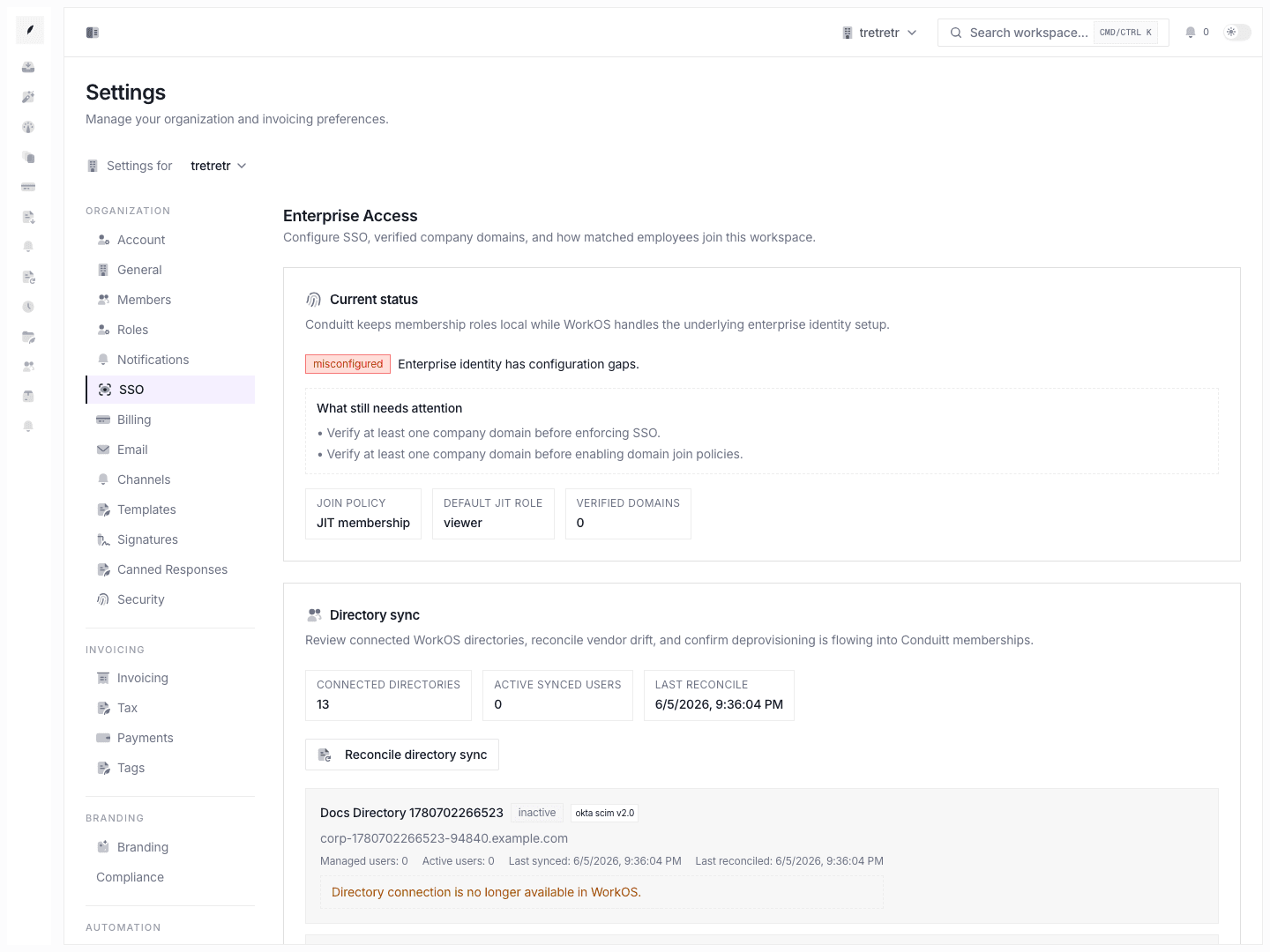
1. Open Settings → SSO and read the current status
The page starts with an enterprise-access status summary. Read that first.
Corinthian uses this status to explain whether the workspace is:
- inactive
- partially configured
- ready for stronger enforcement
The status reasons matter because they tell you what is still missing before SSO should be required.
2. Add the company domains that should map to the workspace
Use the domain controls to add each company domain the workspace should trust.
This is the basis for:
- verified-domain access logic
- domain-based join policy behavior
- future SSO enforcement decisions
- directory sync matching
3. Verify at least one domain before enforcing SSO
After the domain is added, run the verification step from the page.
Do not require SSO until at least one domain is verified. The current enterprise status logic expects verified domains before strict enforcement is turned on.
4. Choose the right join policy
The join policy determines what happens when a user signs in with a matched company domain.
No action
Use this when SSO is not yet part of workspace onboarding and domain matches should not change access automatically.
Suggested workspace join
Use this when matched users should be pointed toward the workspace but still make an explicit join choice.
Automatic pending invite
Use this when matched users should enter the normal invite-approval flow automatically instead of being admitted immediately.
JIT membership
Use this when matched users should be created as workspace members directly during sign-in.
If you choose JIT membership, also set the default role that new just-in-time members should receive.
5. Launch the SSO setup flow from Corinthian
Use the page action that opens the WorkOS SSO setup flow when you are ready to connect the identity provider.
Work from that external setup flow only after the domain and policy choices are already clear. That keeps the Corinthian-side rules stable while the identity connection is being completed.
6. Test the login path before requiring SSO
Run a real sign-in test with a company account before turning on Require SSO.
Verify that:
- the expected identity provider appears
- the user lands in the correct workspace
- the join policy behaves the way you selected
- the resulting workspace role is correct for JIT flows
Only then should you enable SSO enforcement.
7. Turn on Require SSO when the path is proven
Use Require SSO when you want the workspace to block non-SSO authentication for company-managed users.
This is the strongest setting on the page. It should come last, not first.
8. Use directory sync when identity should own lifecycle management
If the enterprise setup includes directory sync, use the lower section to review sync state and reconcile membership when needed.
Directory sync is the right layer when:
- membership should follow the external directory
- user provisioning and deprovisioning should not depend only on manual invites
- the workspace needs a tighter identity-to-membership relationship
Recommended rollout order
- Add domains.
- Verify domains.
- Choose the join policy.
- Set the JIT default role if JIT is enabled.
- Complete the external SSO setup.
- Test sign-in with a real company account.
- Turn on Require SSO only after the test succeeds.
- Add or reconcile directory sync if lifecycle management should be directory-driven.
What to verify before rollout is complete
- the verified domains list reflects the real company domains
- the join policy matches the intended onboarding model
- JIT default role is acceptable if JIT is enabled
- sign-in through SSO works end to end
- owners can still administer the workspace safely
- directory sync status is healthy if it is part of the rollout